Automate Repetitive Tasks to Reclaim Your Schedule
In the fast-paced world of service businesses, time is your most valuable asset. Yet, many owners find their days consumed by manual rebooking, administrative drift, and endless follow-up calls. Learning how to automate repetitive tasks is the first step toward scaling your operations without burning out.
- Average weekly admin time saved
- 12 Hours
- Automated task monitoring
- 24/7
- Reduction in manual rebooking
- 90%
Identifying Repetitive Tasks in Your Daily Workflow
Before you can implement task automation software, you must identify which activities are draining your energy. Look for tasks that are high-frequency, low-complexity, and follow a predictable pattern. These are the prime candidates for business workflow automation.
- Manual appointment confirmations and reminders
- Following up with clients who haven't visited in 60 days
- Updating client records across multiple platforms
- Sending post-service care instructions
- Managing waitlists when cancellations occur

The Benefits of Automated Tasks for Service Providers
Moving to automated tasks isn't just about saving time; it's about accuracy. Human error in scheduling or data entry can lead to double bookings or missed revenue. A robust process automation workflow ensures that every client interaction is handled consistently.
Pros
- Consistent client communication
- Elimination of human entry errors
- Scalable operations without extra staff
- Real-time data synchronization
Cons
- Initial setup time required
- Learning curve for new tools
- Risk of sounding robotic if not personalized
Reducing Administrative Drift
Administrative drift occurs when small manual tasks slowly eat away at your productive hours. By utilizing workflow and process automation, you can ensure these tasks happen in the background while you focus on high-value service delivery.
Workflow Automation Examples for Local Businesses
To better understand how this applies to you, consider these workflow automation examples. A salon might automate the process of reaching out to color clients exactly five weeks after their last appointment to ensure they stay on schedule.
- Trigger: Client completes a service.
- Delay: Wait for a specific duration (e.g., 4 weeks).
- Action: Check calendar for availability.
- Communication: Send a personalized outreach message.
- Resolution: Update the booking system automatically.
Choosing the Right Task Automation Software
Selecting the right tools is critical. You need workflow automation software that integrates with your existing POS and calendar systems. Look for cloud workflow automation solutions that offer API connectivity to Square, Vagaro, or Mindbody.
| Feature | Manual Process | Automated Process |
|---|---|---|
| Rebooking | 15 mins per client | 30 seconds (system check) |
| Reminders | High risk of forgetting | 100% delivery rate |
| Data Entry | Prone to typos | Perfect sync |
Optimizing Your Customer Service Workflow
Your customer service workflow should feel seamless to the client. Automation shouldn't feel like a wall; it should feel like a concierge. This is where process automation and business optimization for service providers come together to create a premium experience.

How to Implement a Business Automation Workflow
Audit
List every manual task you perform daily for one week.
Prioritize
Rank tasks by time spent and ease of automation.
Select Tools
Choose software that connects to your current booking platform.
Test
Run the automation for a small group of clients to ensure it works.
Scale
Roll out the automation to your entire client base.
Managing Your Automation
Effective automation management requires periodic check-ins. You should review your logs monthly to ensure the software workflow process is capturing all intended triggers and that your messaging remains relevant to current trends.
Common Pitfalls in Workflow Process Automation
Do
- Personalize every automated message
- Ensure your calendar is always up to date
- Monitor conversion rates of automated texts
- Use software that syncs in real-time
Don't
- Set and forget without ever checking logs
- Spam clients with too many notifications
- Automate tasks that require deep empathy
- Use generic, robotic templates
Maximizing Revenue Through Automation
The ultimate goal of task automation is to reduce empty time slots. By proactively reaching out to clients when they are due for a visit, you fill your calendar without lifting a finger. This is a core component of modern operational workflow.

Frequently Asked Questions About Task Automation
Is task automation software difficult to set up?+
Will my clients know it's automated?+
Can I automate rebooking for specific services only?+
Does this replace my receptionist?+
The Future of Service Business Efficiency
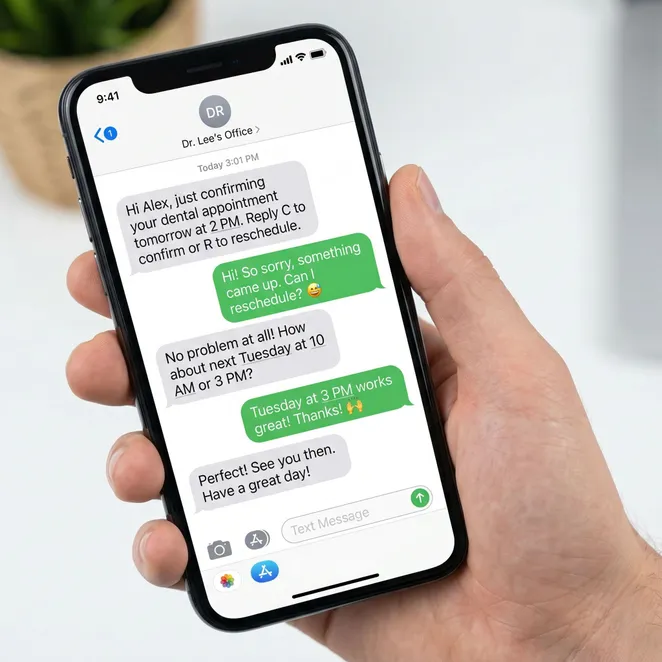
As we move further into 2026, the expectation for 'invisible' software grows. Clients want to interact with your business on their terms, often via text. Implementing automated sms reminders is no longer a luxury—it's a standard for retention.
Automation is not about replacing the human touch; it's about making sure the human touch happens at exactly the right moment every single time.
Bridging the Gap: From Theory to rebook.help
Understanding how to automate tasks is the foundation. But for local service businesses, the most critical repetitive task is rebooking. This is where rebook.help transforms your operational workflow into a revenue-generating engine.
Instead of sending generic links that clients ignore, rebook.help uses calendar-aware logic to offer specific slots via SMS. It integrates directly with your existing software to identify drifting clients and bring them back with zero friction.
- Identify drifting clients automatically
- Offer specific gaps in your schedule
- Allow clients to book by replying with a number
- Sync appointments directly to Square or Vagaro
rebook.help took the most repetitive part of my day—texting clients to come back—and made it happen while I was cutting hair. My chair is never empty now.
Over 500 service businesses reclaimed their schedules last month.
Data verified as of June 2026.
Reclaim Your Schedule Today
Stop chasing drifting clients manually. Let rebook.help handle your rebooking automation while you focus on your craft.
Learn More About Automation
Explore more in Operational Efficiency & Automation
AI Receptionist and Agentic Operations for Service Businesses
Automating Salon and Spa Operations for Maximum Efficiency
Operational Efficiency & Automation Hub
Process Automation and Business Optimization for Service Providers
Small Business Automation: Streamlining Service Operations
Workflow Automation for Service Businesses
Related categories
Effective task automation is the backbone of a modern service business. By identifying repetitive tasks and implementing the right software, you can eliminate administrative drift and focus on what truly matters: your clients.
- Efficiency
- Automation
- Growth
- 2026 Trends
Thank you for exploring how to optimize your business. We are committed to helping you find the best tools for your specific needs.
For further reading, check out our guides on SMS marketing and advanced scheduling techniques.
Stay tuned for more updates on how AI and automation are reshaping the local service industry.
Final note: Always ensure your automation complies with local SMS regulations and privacy laws.
End of guide.