How to Send Professional SMS Reminders to Clients
Learning how to send sms reminders effectively is the fastest way to reduce no-shows and protect your revenue. A well-timed message ensures your schedule stays full while providing a concierge experience for your customers.
- Average SMS Open Rate
- 98%
- Reduction in No-Shows
- 40%
- Average Response Time
- 3 min
The Essentials of a Professional Reminder Text
When you send text reminders to clients, clarity is your priority. Every message should include the business name, the specific service, and the exact time of the appointment to avoid any confusion.
- Include your business name clearly
- State the date and time of the visit
- Provide a clear action (Confirm or Reschedule)
- Keep the tone professional yet friendly
- Include your cancellation policy if relevant
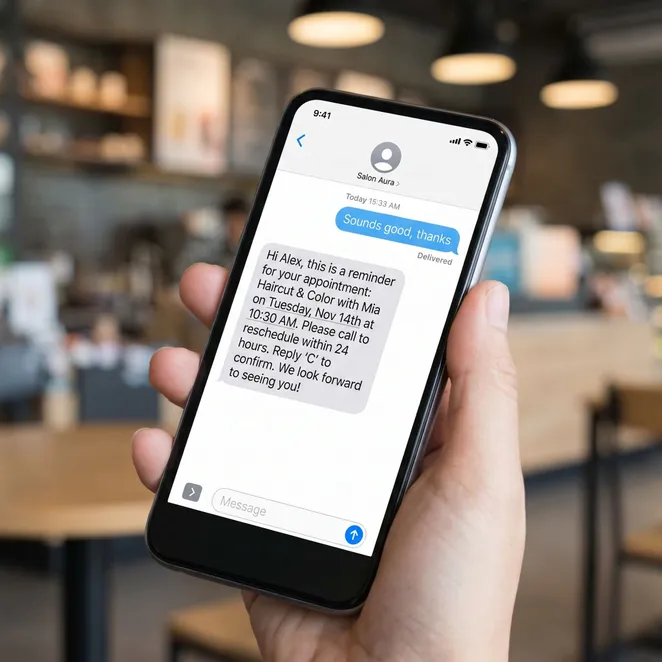
Timing Your SMS Reminders for Maximum Impact
Timing is everything when you send reminder text alerts. Sending too early leads to forgetfulness, while sending too late doesn't allow enough time to fill a vacated slot.
Confirmation
Send an appointment confirmation text immediately after the booking is made.
48-Hour Reminder
Send a reminder 48 hours before the visit to allow for easy rescheduling.
Day-Of Alert
A final nudge 2-4 hours before the appointment for same-day logistics.
Best Practices for Sending Text Message Reminders
To send text message reminders that actually work, you must respect the client's time. Avoid sending messages during late-night hours or early mornings.
Do
- Personalize with the client's first name
- Use a recognizable business phone number
- Keep the message under 160 characters
- Provide a way to opt-out of future texts
Don't
- Don't use excessive emojis or slang
- Don't send more than three reminders per visit
- Don't use all caps for emphasis
- Don't forget to include the location address
Crafting the Perfect Appointment Reminder Message
An effective appointment reminder message serves as a helpful nudge. It should feel like a service, not a sales pitch, ensuring the client feels valued.
| Message Type | Best For | Example Content |
|---|---|---|
| Confirmation | New Bookings | Hi [Name], your visit to [Business] is set for [Time]! |
| Reminder | 48h Before | Reminder: [Name], you have an appt at [Business] on [Date]. |
| Follow-up | Post-Visit | Thanks for visiting! We'd love to see you again soon. |
How to Remind Clients Without Being Intrusive
Understanding how to remind clients requires a balance of persistence and politeness. You want to stay top-of-mind without cluttering their inbox.
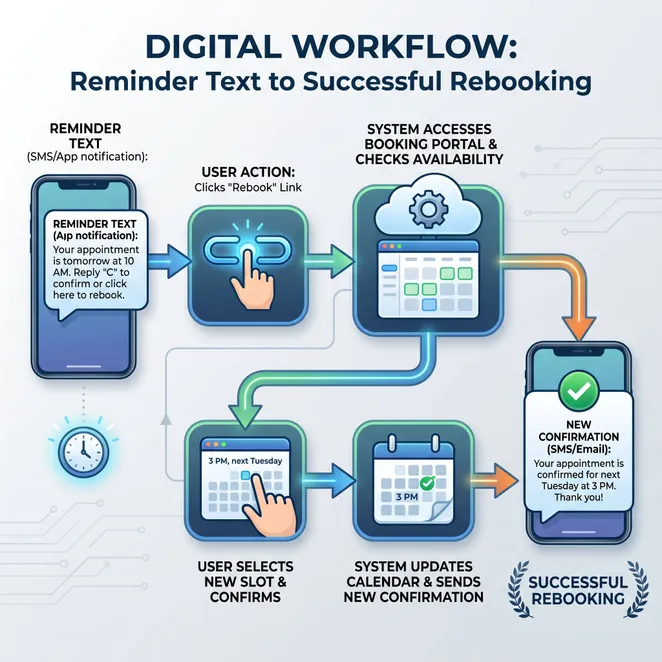
Transitioning from Reminders to Rebooking
While reminders prevent no-shows, the real goal is retention. You can use a text to schedule appointment requests for clients who haven't visited in a while.
Comparing Email and Text Appointment Reminders
Many businesses use both email and text appointment reminders. While email is great for long-form details, SMS is superior for immediate action and confirmation.
Pros
- Instant delivery and high open rates
- Higher engagement for confirmations
- Convenient for mobile-first users
Cons
- Limited character count for details
- Requires explicit opt-in consent
- Can feel intrusive if overused
Using an Appointment Confirmation Text Effectively
The appointment confirmation text is the first touchpoint in your SMS strategy. It sets the tone for the entire client relationship.
Confirmation Message Check-list
- Verify the service type
- Confirm the provider name
- Include a link to the map/location
- Mention any prep work needed
Scaling Your SMS Strategy
As your business grows, manually sending sms reminders to clients becomes impossible. Automation allows you to maintain a high standard of communication without the labor.
Automating our reminders didn't just save us time; it saved our sanity and increased our monthly revenue by 15%.
SMS Client Reminders for Different Industries
Different services require different approaches to sms client reminders. A barber might need a quick nudge, while a med spa might need to include pre-treatment instructions.


Handling Cancellations and Reschedules via SMS
When you send sms reminders, you will inevitably receive cancellation requests. Having a professional protocol for these replies is essential for maintaining your calendar.
The 'Reply to Reschedule' Workflow
Instead of just accepting a cancellation, offer immediate alternatives. This keeps the client on the books and prevents them from drifting away.
Templates for Text Appointment Reminders to Clients
Using standardized text appointment reminders to clients ensures consistency. You can find more specific text message appointment reminders in our template library.
How many reminders should I send?+
Can I include links in my SMS?+
What is the best time of day to send reminders?+
The Psychology of SMS Reminders
SMS feels personal. When a client receives a text, they feel a social obligation to respond that doesn't exist with email. This is why text reminders to customers are so effective.
Measuring the Success of Your SMS Strategy
Track your no-show rate before and after implementing a professional SMS strategy. You should see a significant decrease within the first 30 days.
Why Manual Reminders are Costing You Money
If you are still manually typing out every reminder, you are losing hours of productive time every week. This time could be better spent serving clients or growing your business.
How rebook.help Enhances Your SMS Strategy
While standard reminders are great, rebook.help takes it a step further. We don't just remind; we proactively rebook your drifting clients using calendar-aware logic.
Join over 500 salons using rebook.help to fill their calendars.
Updated June 2026
Next Steps for Your Business
Ready to move beyond basic reminders? It's time to implement a system that works while you sleep, ensuring your chairs are always full and your clients are always happy.
Stop Chasing Clients and Start Rebooking
Automate your retention with reply-to-book SMS that integrates with your existing calendar.
Explore more in Business SMS Marketing
Automating Your Client SMS Workflows for Maximum Retention
Choosing the Best Appointment Text Reminder Service for Your Business
Free Appointment Reminder Templates and SMS Tools
Implementing Automated Appointment Reminder Text Solutions
SMS Marketing for Salons and Wellness Providers
The Evolution of Business SMS Marketing: From Links to Conversions
The Ultimate Guide to Business Text Reminders
Related categories
- SMS Marketing
- Client Retention
- Business Growth
- 2026 Guide